



Quick answer: Website accessibility improves user experience, search rankings, and conversion rates. Improve colour contrast to Web Content Accessibility Guidelines (WCAG) 4.5:1 standard. Restructure content with proper headings and short paragraphs. Optimise images with alt text and add captions to videos. These require no website rebuild and benefit all users.
Website accessibility directly improves user experience, which means better search rankings and higher conversion rates. When more people can use a website effectively, more of them become customers.
The relationship between accessibility and SEO is straightforward, and they improve together because they’re built on the same foundation. Both require clear information architecture, fast-loading pages, and content that’s easy to understand.
The challenge isn’t that accessibility is complex. It’s that many feel it’s a technical requirement separate from design and marketing strategy.
In reality, accessibility improvements often deliver the fastest return on effort because they solve real usability problems that affect an entire audience.
Here are three techniques that business owners and marketing managers can use today to make a website more accessible for visitors. Each requires minimal investment and delivers measurable results.
1. Changing colour contrast
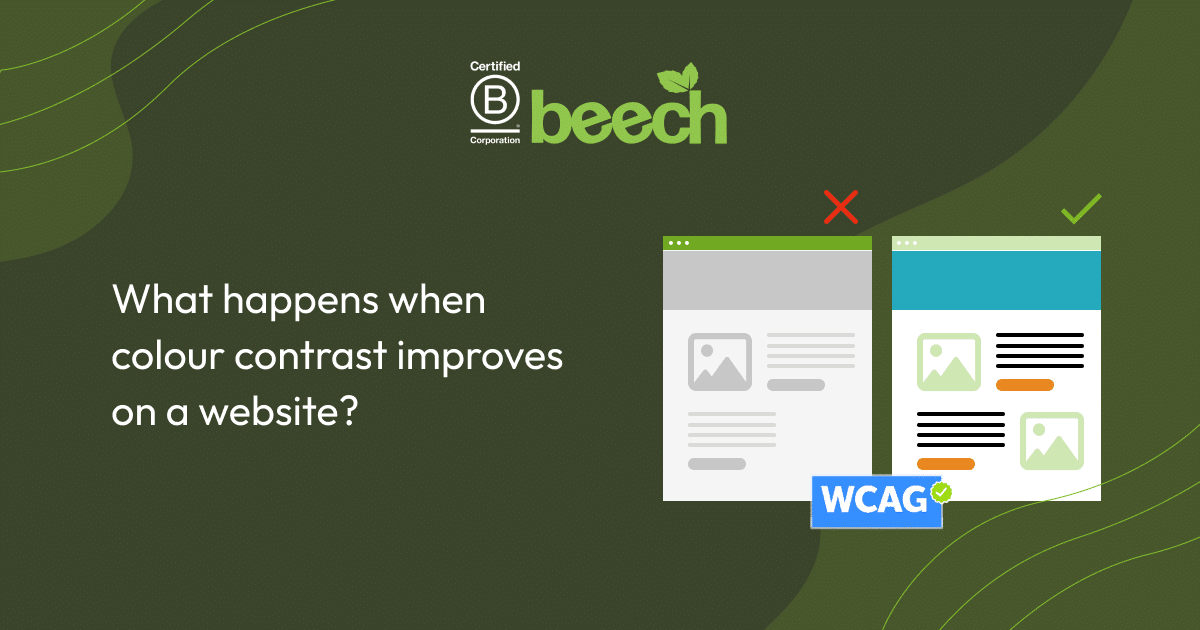
What happens when colour contrast improves on a website?
Better colour contrast improves website accessibility and readability for all users, which directly impacts how search engines evaluate a page. Google’s algorithm measures user engagement metrics like bounce rate, time on page, and click-through rate to determine how engaged visitors are when they click on a website.
So, when text content is easy to read and when colour contrast is strong, users stay longer and engage more with the content, which signifies to Google the website is more valuable to their users.
Why does this matter for an organisation?
Better contrast directly reduces friction in the user experience. Users read faster, understand information more clearly, and spend more time on pages. Longer engagement time signals to Google that a page provides value, which improves search engine ranking. Reduced friction also means more visitors move through the sales pipeline, rather than leaving a site altogether.
What is colour contrast on a website?
Colour contrast refers to the difference between text and its background. Low-vision users, colour-blind users, people viewing on mobile devices in bright sunlight, and users experiencing eye strain all benefit from stronger contrast.
From a business perspective, anyone on a poor-quality screen, anyone reading in a hurry, or anyone distracted benefits as well. Which covers most of our audience.
The Web Content Accessibility Guidelines (WCAG) recommend a minimum contrast ratio of 4.5:1 for standard text. This means:
- Darker text on lighter backgrounds
- Lighter text on darker backgrounds
- Sufficient visual separation between words so they remain readable.
How to change a website’s colour contrast
Use a free contrast checker tool. Paste in the text colour and background colour of a page. If the ratio falls below 4.5:1, adjust one or both colours slightly. Small adjustments in colour values often solve the problem without affecting the brand aesthetics and visuals.
Pair colour with meaningful labels or icons to convey information clearly. For example, use the word “Error” alongside red text, or include an icon with status updates. This approach improves clarity for all users and it’s actually clearer for everyone because it provides multiple signals rather than one.
At Beech, we add an accessibility plugin to all new websites, to make colour contrast a feature visitors can control, too. If you’d like it adding to your WordPress website, get in touch.

2. Accessible content structure
How does clear content structure affect search performance?
Proper content structure improves how search engines understand each page of a website.
Google’s algorithm looks at more than just words on the page, it examines how those words are organised. A page with logical heading hierarchy and scannable formatting signals that content is well-researched, well-organised, and valuable to visitors, which makes Google more confident about ranking them highly. This makes it a valuable technique for improving website accessibility.
Outside of search engines, clear structure changes how users interact with content. Pioneering research from the Nielsen Norman Group showed that in 1997, 79% of users scan content rather than reading every word. This study was revisited in 2020, and confirmed that even 23 years later, users are prone to scanning a webpage instead of progressing line by line and reading every word.
This means that content has to be scannable. Allow visitors to find what they’re looking for quickly and efficiently and avoid them going to a competitor.
What does having the right content structure mean?
Content structure refers to how information is organised through headings, paragraph length, formatting, and visual hierarchy. Having the right content structure means that visitors using a screen reader or those with cognitive disabilities can process information more effectively when content is well-organised.
Every visitor benefits from content they can scan and understand quickly.
Why is clear content important for my website?
Users who find what they’re looking for quickly are more likely to stay on a website longer. Clear structure keeps users on pages, reduces bounces, and creates pathways through a user journey toward conversion.
Simultaneously, Google favours pages with the right information and a good page experience in its ranking. Better structure also often means faster page load times because we’ve removed unnecessary words and streamlined the design.
How can I make my content structure clear?
1. Use proper heading hierarchy.
Start with a single H1 for your page title, follow with H2s for main sections, and H3s for subsections. This structure helps both users and search algorithms understand your content and its relationships.
Maintain proper heading levels throughout because consistency helps both people and machines interpret page structure.
2. Keep paragraphs short.
Two to four lines maximum works well because it forces clarity and removes unnecessary words. Present one main idea per paragraph, and use bullet points where sequential information matters.
Highlight key information visually where it helps users understand priority.
3. Use AI to help rewrite each page
If content revision feels overwhelming, AI tools can help accelerate the process.
Here’s a free prompt to use to help make content more concise and well structured:
“Rewrite this content to be clearer and more concise while keeping the original meaning. Use short paragraphs, plain language, and scannable formatting.”
If you’d like help optimising your content for structure, clarity and AI search, speak to our team of specialists now.

3. Image and video optimisation
What is the benefit of optimising images and videos on a website?
Optimised images and videos improve page speed, which is one of Google’s top ranking factors, benefitting website accessibility and user experience. A high-performing website, with fast pages will encourage visitors to stay and read the content, increasing the likelihood of conversion.
What does it mean to optimise images and video content on a website?
Image and video optimisation refers to making media files smaller, faster to load, and accessible to all users. This includes:
- Reducing file sizes
- Ensuring proper formatting for different devices
- Adding descriptive information so screen readers and search engines understand what the media represents.
Why should images and video always be well-optimised?
Well-optimised images and videos load quickly, which helps search rankings while simultaneously expanding our potential audience by working for screen reader users and those with assistive technologies.
For many organisations, a significant amount of website traffic comes from mobile devices, meaning properly optimised media that displays correctly across all screen sizes becomes essential.
When we solve these technical requirements, we address multiple business outcomes at once:
- Faster load times improve rankings
- Broader accessibility expands who can convert
- Mobile-first design captures traffic where our audience is.
As well as this, adding captions and descriptions increase watch time and engagement by helping users understand the content fully. A recent study suggested that 75% of people say they often keep their phone on mute even while watching a video, meaning captions and transcripts are a necessary to hold our audience’s attention.
How can I optimise images on a website?
1. Add alt text that describes the purpose of the image
Focus on function rather than appearance. For example, use “Woman signing a digital contract on tablet” rather than “Woman at desk.” This helps screen readers convey meaning while also helping Google understand what an image represents.
Where possible, use relevant keywords.
2. For purely decorative images, mark them as such so screen readers skip them
There’s no need to describe visual decoration, which would add unnecessary information.
3. Check image file sizes
Large image files slow page load times, especially on mobile networks. Responsive images, which resize for different screen sizes, improve mobile experience and reduce data usage for users on slower connections.
How do I make videos more accessible?
1. Keep videos short
Shorter videos load faster and are easier to process. Aim for under two minutes where possible because viewer attention drops off significantly after that point.
2. Add captions
Captions help Deaf and hard-of-hearing users access content. They also help anyone watching without sound, which includes most people viewing on mobile in public spaces.
Studies also show captions increase video watch time by an average of 80% because they help viewers follow along, especially in noisy environments or when audio isn’t available.
3. Ensure video controls work well on mobile devices
Make text readable and controls easy to tap. Design for the smallest screen an audience uses, as many will be using mobile devices and tablets to watch video content.

Get started making your website accessible today
Website accessibility improves user experience, search rankings, and conversion rates, and the three changes we’ve broken down will help to deliver results without requiring a website rebuild.
The effort involved depends on your current website. Many find success tackling one change at a time, with colour contrast often delivering the fastest visible results.
If you have the timeline and resources to implement these changes yourself, start with the steps above. If you’d rather focus on strategy while we handle the technical work, including adding an accessibility plugin for ongoing compliance, let’s chat about what’s next.
Get in touch with our specialist team and make your website more accessible now.